
New Timecoding as of October 30, 2025
As of October 30, 2025, LUNA implemented a well-researched and advanced Timezone Database that provides more accurate timecoding for charts cast before the year 1970. Prior to this date, there were some discrepancies between LUNA’s pre-1970 charts and other astrology programs. Mostly this was due to incorrect Daylight Savings Time (DST) calculations.
These discrepancies are now resolved and should no longer occur.
It’s possible that you have charts in your account for dates prior to 1970. We’ve taken the liberty of re-timecoding these charts for you and have also provided a convenient way for you to review these changes so you can either accept or reject them.
What is Timecoding?
Timecoding is the process of determining the Coordinated Universal Time (UTC) of an astrology chart based on the chart’s date, time and location. Astrology charts are created using a local time, but that local time’s UTC value is dependent on whether or not Daylight Savings Time is in effect. It’s also dependent on historical data because both the UTC offset and the DST value of a particular location can change depending on the date and time used for that location.
How to Review Your Charts
1. Navigate to Charts > My Charts
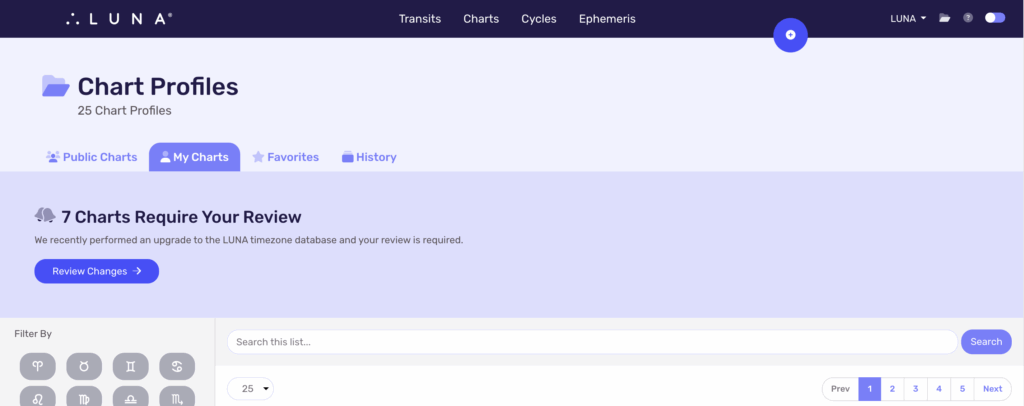
If you see this notification on your My Charts screen, then you need to select the “Review Changes” button to see the changes LUNA is proposing to make to your charts so you can approve or reject them:
2. Select “Review Changes”
You’ll be taken to a list of only those charts that LUNA is proposing to make timecode changes to. You can review the proposed changes now or come back at a later time to do it.
3. “Accept” or “Reject” Each Chart
Accepting or rejecting LUNA’s proposed changes is entirely up to you. However, we’ve done our best to make it as easy as possible by doing the following:
- Showing you if choosing “Accept” would affect the ascendant or not
- Providing a recommended choice for you based on that
- Showing you a list of what the changes are so you can inspect them yourself
What does it mean if the ascendant is changing?
The ascendant is typically what astrologers use to verify the accuracy of a chart and is highly sensitive to Daylight Savings Time. This is why we show you the current ascendant of the chart and the proposed one based on the new timecode.
In this example, accepting the changes LUNA is proposing would change the ascendant from 12º Aquarius to 2º Pisces. To inspect the proposed changes, select the “Show Proposed Changes” link to see the details of what’s changing for this chart:
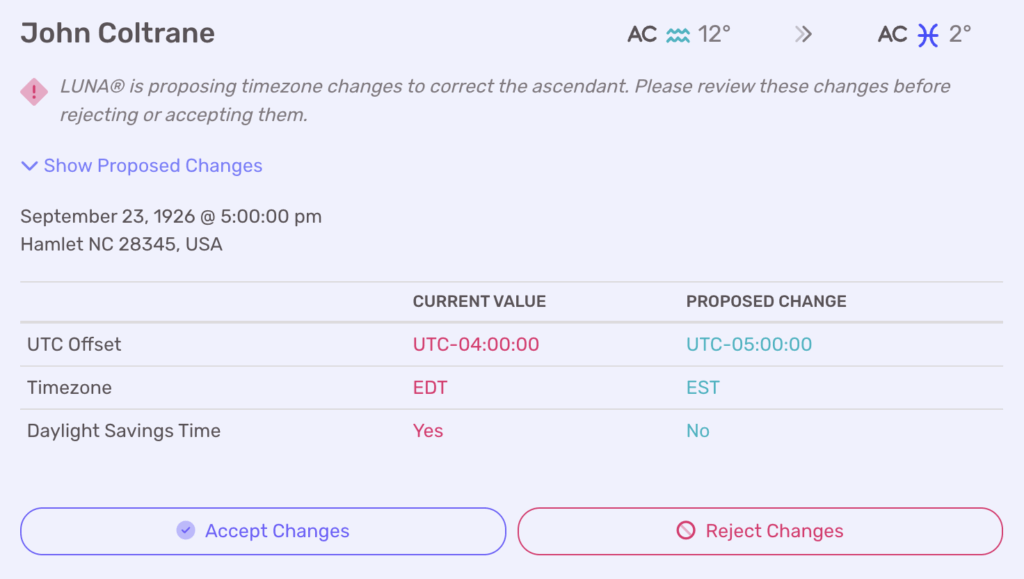
You can see that the new timecode values indicate that Daylight Savings Time was not observed at the time of this birth.
Given that LUNA’s new and improved Timezone Database more accurately determines Daylight Savings Time for pre-1970 charts, we recommend accepting these changes in this example.
What if the ascendant isn’t changing?
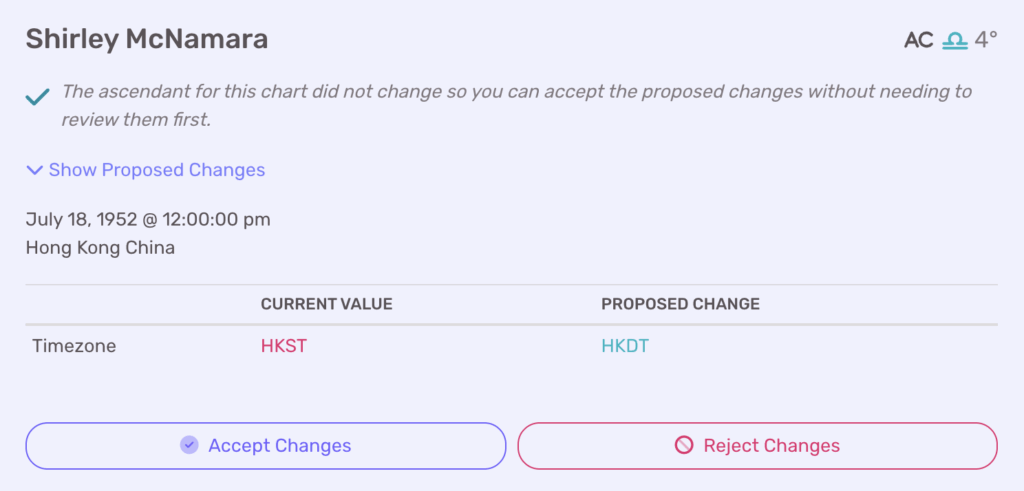
Sometimes timecoding modifies other data (see table below) that doesn’t affect the ascendant or other factors in the chart. However, since this underlying data is still changing, we’re showing it to you so you can have the final say.
In this example, only the timezone abbreviation changed so accepting the changes would only update that piece of information:
What about my custom UTC Offset?
Prior to this Timezone Database upgrade, charts created for dates before 1970 might have had an incorrect Daylight Savings Time value. We used to recommend editing the UTC Offset in order to account for this. Now that your charts have been re-timecoded with the new database, it’s possible you’ll see charts that you’ve applied a custom UTC Offset to appear in your review list.
Special attention should be paid to these charts during your review and we recommend checking if the ascendant is changing:
- If no, select “Accept Changes” because your custom UTC Offset is no longer needed;
- If yes, carefully inspect the proposed changes before making your decision because it’s possible your custom UTC Offset is wrong or you perhaps customized it for some other reason.
Timecode Data
Below is a table explaining what all of the different timecode data fields are. If any of these fields changed after LUNA re-timecoded your charts, the chart and the relevant fields will appear on the review page.
| Field | Example | Purpose |
| Local Time | October 30, 2025 @ 12:00pm | The time of some astrological event |
| UTC Time | October 30, 2025 @ 19:00pm | Same as Local Time, but in UTC |
| UTC Offset | UTC-07:00:00 | Difference between the Local & UTC Times |
| Timezone | PDT | Timezone abbreviation |
| Daylight Savings Time | Yes | Is Daylight Savings Time observed for this location at the Local Time? |
| TZ Identifier | America/Los_Angeles | The IANA’s timezone identifier |
Help… I’m still confused!
We get it! Timecoding is a complex topic and we want you to feel empowered by this process, not overwhelmed. Although we’ve done our best to make this process as straight-forward and simple for you as possible, we realize you may still have questions. If so, please reach out through our regular support request form by following the link below: